While computers have dramatically advanced in speed, size, and flexibility over the past few decades, one component continues to frustrate users: the mouse. This annoyance is sometimes informally called Frustratio Musa (Latin for “mouse frustration”) in the tech world and can occasionally lead to users abandoning or even throwing their peripheral.
The common symptoms of this mouse frustration include:
- Ergonomic limitations: Devices that aren’t comfortable for long-term use.
- Limited input flexibility: A lack of options beyond basic clicks and scrolling.
- Outdated interaction: The absence of modern features like programmable keys.
- Keyboard interruption: The constant need to move a hand away from the keyboard, breaking workflow.
Despite massive leaps in computing power, these fundamental limitations of the traditional mouse continue to hinder user efficiency and satisfaction.
Prolo Ring: Redefining Mouse Control with Wearable Tech
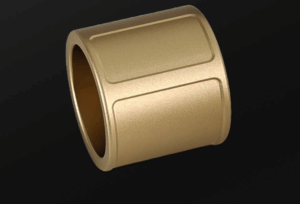
The good news for frustrated computer users is that a sleek, wearable solution is now here. The Prolo Ring aims to replace the traditional desktop mouse with an ergonomic, gesture-based device that dramatically enhances precision and productivity. This compact ring brings full cursor control, scrolling, clicking, shortcuts, and over 40 distinct gestures directly to your dominant hand.
Seamless Control and Design
The Prolo Ring allows you to navigate, create, or present effortlessly without ever reaching for a mouse. Its patented Modtouch™ technology is the key to its powerful functionality. This system features a two-zone touch surface. A Trackpad and a Modstrip combined with an integrated 6-Axis Motion Sensor to offer unparalleled, customized control. Simply slip the ring on, and it instantly wakes with a touch, while smart sleep algorithms conserve power when idle.
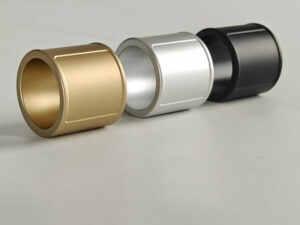
It comes in US sizes 7–14 (with adjusters for size 6) and is available in three stylish colors: Champagne Gold, Future Silver, or Carbon Black.
Solving the Mouse’s Biggest Limitations with a Single Ring
The ring’s built-in functions cover all essential tasks:
- Cursor Control: Moving the cursor, left/right/middle clicking, and click-and-drag operations.
- Navigation: Actions like page up/down, arrow navigation, panning, and pinch in/out.
- Media: Controls for camera shutter, volume, track skipping, and play/pause.
For power users, the Pro Edition and higher unlock advanced customization through the optional Prolo Studio App. This desktop companion allows you to precisely map gestures to actions, acting as the “translator” between your hand movements and your screen. You can customize gestures to trigger keyboard shortcuts, perform media controls and mouse actions, open applications instantly, and even execute complex macro sequences.

Charging and Portability
Charging the Prolo Ring is simple and flexible. You can charge it directly with the included USB cable, or use the Ring Case Charger (included in Standard and Pro Editions). The case not only safely stores your ring but can also charge it multiple times, providing up to 30 days of extended use before needing to be recharged itself. A full charge for the ring takes about 30 minutes.
Say goodbye to Frustratio Musa and hello to effortless efficiency. The Prolo Ring proves that the most powerful solutions are often the most compact and intuitive.
Features and Specifications
- Dimensions: 23mm (width) x 2.8mm (thickness)
- Colors: Champagne Gold, Future Silver, or Carbon Black.
- Sizes: US sizes 6–14.
- Weight: 4.1g – 5.2g
- Control Surface: 80x30mm captive touch
- Compatibility: Windows, MacOS, Computers, Smartphones, Tablets, Linux
- Button Free, Minimal Design
- Power:
- Ring Battery Capacity: up to 8 hours of typical use
- Case Battery Capacity: up to 30 days
- Interface: USB type C
- Charge Time: < 30 minutes
- Status: Seeking funding on Kickstarter, availability
For more information or to purchase the Prolo Ring
About the Prolo Team
We’re engineers, designers, and creators who live on the keyboard — and we were tired of breaking flow just to move a cursor.