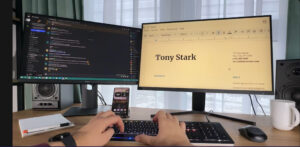
The modern computer keyboard traces its lineage back to the 19th‑century typewriter, most notably the work of Christopher Latham Sholes, who patented the Sholes & Glidden typewriter in 1868. Its QWERTY layout. Originally engineered to prevent mechanical jamming it became the foundation for nearly every keyboard that followed.
The computer mouse arrived almost a century later. Invented by Douglas Engelbart and Bill English in 1964 at the Stanford Research Institute, the first mouse was a simple wooden block with wheels, created as a more intuitive way to interact with computers than typing commands alone.
The integration of the mouse and keyboard emerged gradually as computing shifted from text‑based interfaces to graphical user interfaces (GUIs). Early computers relied exclusively on keyboards, which evolved from mechanical typewriters into digital command devices. But as GUIs took hold in the 1980s, the mouse became essential for navigating on‑screen elements, and the two devices formed the dual‑input paradigm that defined personal computing for decades.
Despite their long histories, the evolution of the mouse and keyboard. Aside from specialized gaming hardware has remained relatively incremental in recent decades. That stability is now being challenged by a new wave of interaction models that blend typing, touch, gesture, and adaptive intelligence into unified input systems.
Gesture‑Enabled Keyboard
The CLVX1 represents this new direction. It is a gesture‑enabled keyboard with an integrated touchpad built directly into the keys, powered by Clevetura’s TouchOnKeys® technology. Instead of relying on a separate mouse, the CLVX1 allows you to perform gestures directly on the key surface, switching seamlessly between typing and touch modes.
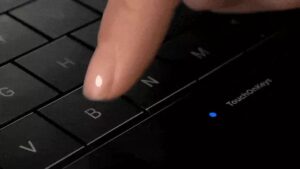
Two dedicated touch sliders provide fast, intuitive control for actions such as adjusting volume or brightness, and their behavior can be fully customized through the TouchOnKeys app. Its scissor‑switch keys deliver a familiar laptop‑style typing feel, while the keyboard automatically disables touch input during typing to prevent accidental gestures. You can connect the CLVX1 to up to four devices at once. One via USB‑C and three via Bluetooth . And switch between them instantly using the channel keys.
Lighting & Visual Experience
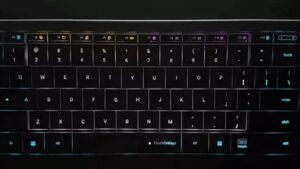
The CLVX1 uses 131 individually addressable RGB LEDs to give each key its own customizable lighting profile, allowing you to tailor the keyboard’s appearance to your workspace or mood. As your fingers move across the surface, the gesture‑responsive backlight animates in real time, creating a visual trail that reinforces every interaction. An ambient light sensor automatically adjusts brightness, ensuring the lighting remains balanced and comfortable in any environment.
Adaptive Intelligence (AI Mode)
The Adaptive Intelligence system learns your personal typing style and uses that information to refine how the keyboard switches between typing and gesture modes. Over time, it becomes better at predicting your intent, reducing accidental mode changes and making the experience feel more natural. You can trigger a training session at any time, and all learning happens locally on the device to preserve privacy. For users who prefer manual control, sensitivity can also be adjusted through nine selectable levels.
Platform Support
The CLVX1 offers full native support on Windows 11, enabling all gestures without requiring additional software.

On macOS 14 and newer, the keyboard delivers complete functionality when paired with the TouchOnKeys app and the latest firmware.
Linux users on Gnome/Wayland can rely on core features such as typing, clicking, scrolling, and multi‑finger gestures.
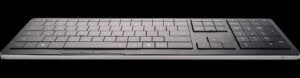
iPadOS supports standard Bluetooth gestures out of the box.
Basic mouse‑style interactions are available on Android, iOS, VisionPro, WebOS, and Tizen, though advanced gestures like pinch‑to‑zoom are not supported on those platforms.
By merging typing and cursor control into a single fluid motion, the CLVX1 removes the hand‑to‑mouse shuffle that interrupts productivity. The result is a workflow engineered for speed, focus, and a cleaner desk.
Features and Specifications
- Dimensions: Height 12.4 mm x Width 437 mm x Depth130 mm
- Weight: 640 g
- Touch Area Size: 186×84 mm
- Connectivity:
- Wired: USB Type-C (ver. 2.0). Cable included
- Wireless: Bluetooth (ver. 5.1) – 3 channels
- Keyboard Layout: Windows ANSI
- Language: US
- Number of Keys: 110
- Touch RGB Backlight: 131 pcs of per-key addressable RGB LEDs
- Battery Type: Li-ion Polymer Battery
- Platforms: Windows 10/11. MacOS coming soon
- Battery Capacity: 1900 mAh
- Estimated Working Time: Up to 40 hours of uninterrupted work — around 1.5 weeks of normal usage (without backlight). Backlight could significantly decrease working time
For more information or to purchase the Clevetura 1
About Clevetura
Established in 2017, we have continuously pushed the boundaries of TouchOnKeys® technology, constantly evolving and enhancing.