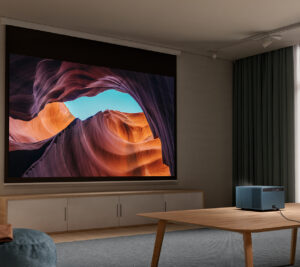
Projectors have come a long way from the bulky, complicated units that needed precise placement, constant tweaking, and often a dedicated room. These days, most people want something much simpler—a projector that delivers a big, immersive image without turning setup into a project of its own.
That’s exactly where the ViewSonic LX60HD fits in.
This is a Full HD smart projector built for ease of use. It includes features like autofocus, automatic keystone correction, obstacle avoidance, and built-in Google TV, all aimed at making setup as simple as possible. Whether it’s in a living room, bedroom, cottage, or even the backyard, the goal is clear: set it down, power it on, and start watching.
After using it in a range of situations, it’s clear the LX60HD isn’t trying to compete with high-end home theatre projectors. Instead, it focuses on delivering a straightforward, enjoyable experience for everyday use.
First Impressions and Design
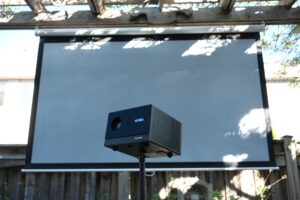
The LX60HD makes a strong first impression. It’s compact, cleanly designed, and doesn’t feel out of place sitting in a living room or on a shelf. Compared to many projectors in this price range, it looks a bit more considered, rather than just another plastic box.
It’s also light enough to move around easily, which ends up being one of its biggest advantages. One night it can be set up for a movie in the family room, and the next it can head outside for a backyard screening. That flexibility adds real value.
Build quality feels solid overall. Nothing stands out as fragile or overcomplicated. Controls are simple, and the projector is easy to get familiar with right out of the box.
Hardware Overview
The LX60HD uses a native Full HD (1920 × 1080) resolution system. While 4K projectors are becoming more common, Full HD is still more than enough for most streaming content, sports, and casual gaming.
It also uses an LED light source instead of a traditional lamp. That means no bulb replacements, less heat, and quicker startup and shutdown times. For most people, it’s a “set it and forget it” setup that should last for years without maintenance.
Smart Features: The Real Star of the Show
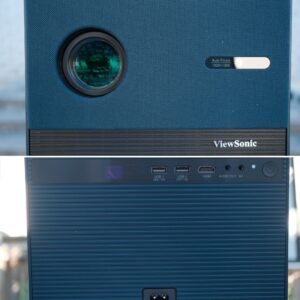
What really sets the LX60HD apart is how much of the setup it handles on its own.
Autofocus works quickly whenever the projector is moved, keeping the image sharp without any manual adjustment. Automatic keystone correction helps square the image even when the projector isn’t perfectly aligned, which makes placement far more forgiving.
One feature that stands out in real use is obstacle avoidance. The projector can detect objects on the wall, like picture frames or switches, and adjust the image to avoid them. It’s not something you think about upfront, but once you see it in action, it’s genuinely useful.
There’s also automatic screen alignment, which helps fit the image to a projection screen with minimal input.
Individually, these features might seem small. Together, they remove most of the usual setup friction. After using them, going back to a fully manual projector feels like a step backward.
Google TV and Smart Streaming Experience
Built-in Google TV turns the LX60HD into a complete entertainment device rather than just a projector.
Streaming apps like Netflix, YouTube, Disney+, and Prime Video are all available directly on the device, so there’s no need to plug in external hardware. The interface is familiar and easy to navigate, with personalized recommendations and solid overall performance.
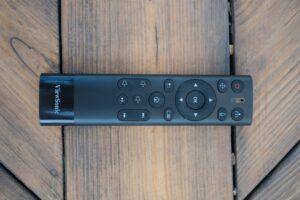
Setup is also straightforward. Using the Google Home app, most of the configuration can be done from your phone instead of typing everything out with a remote. From powering it on to streaming content, the whole process only takes a few minutes.
Combined with the automatic image adjustments, the overall experience is very simple. It’s especially well suited for people who don’t want to spend time dialing in settings.
Picture Quality
For a Full HD projector, the LX60HD delivers a strong image.
On a 120-inch screen, the image looks sharp and detailed, especially with good-quality streaming content. Colors are one of the stronger aspects—bright without being overdone, and generally natural-looking for movies and TV.
Contrast is decent for this category, though it can’t match higher-end home theatre projectors. Dark scenes are still watchable, but blacks aren’t as deep.
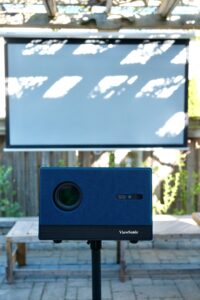
Like most projectors, lighting conditions matter. It performs best in the evening or in darker rooms. In brighter environments, the image starts to lose contrast.
That said, in the right conditions, it delivers a much larger and more immersive experience than a traditional TV.
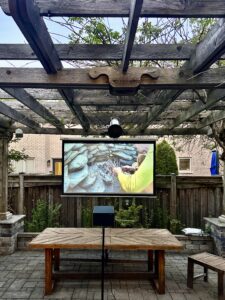
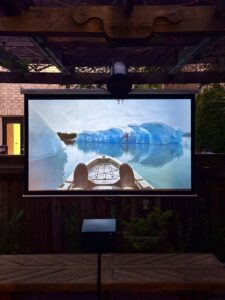
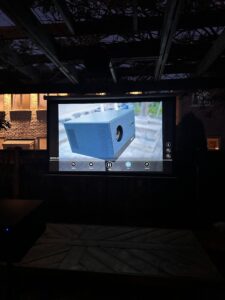
Home Theatre and Backyard Movie Nights
Portability is a big part of the appeal here.
Moving the projector from inside to outside is easy, especially when paired with a simple stand. For backyard movie nights, setup is quick—place it down, let the automatic adjustments do their thing, and start streaming.
It’s a practical setup for casual use, whether it’s movies, sports, or just having people over. The convenience plays a big role in how often you’ll end up using it.
Who Is This Projector For?
The LX60HD is best suited for:
- First-time projector buyers
- Families
- Streaming enthusiasts
- Casual gamers
- Apartment and condo owners
- Backyard movie enthusiasts
- Users seeking a portable entertainment solution
It is less suited for:
- Dedicated home theatre purists
- Competitive esports gamers
- Users requiring true 4K projection
- Bright-room daytime viewing enthusiasts
Final Verdict
The ViewSonic LX60HD works because it focuses on what most people actually want: something that’s easy to use and doesn’t require much effort to get going.
Image quality is solid for a Full HD projector, and the LED light source adds long-term convenience. But the real value is in how much of the setup process it takes off your hands.
Features like autofocus, keystone correction, obstacle avoidance, and built-in Google TV make a noticeable difference in day-to-day use. Instead of adjusting settings and repositioning the projector, you can just turn it on and start watching.
It’s not meant for enthusiasts chasing the best possible picture quality. But for most people looking for a simple, portable, and flexible big-screen experience, the LX60HD offers a very strong overall package.